Backup and Restore > Scheduling a Backup with the MSS

Scheduling a Backup with the MSS

To Schedule a Backup

  1. Using CygNet Explorer, select the MSS from the service hierarchy.
  2. Right-click in the service pane on the Tasks page, select the Set Info Keyword Task task.
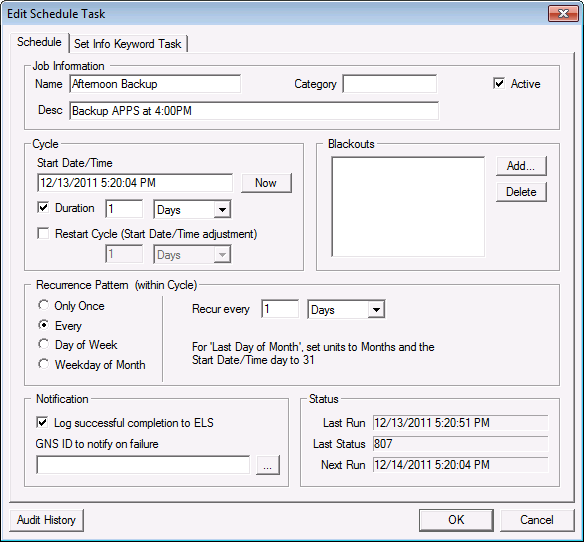
  3. On the Schedule page, define the schedule properties including the task identifier, cycle information, blackouts, and logging. See Schedule Properties.

Schedule page

  1. On the Set Info Keyword Task page, select the service for which you want to schedule an on-demand backup.
  2. Select BACKUP_NOW from the Info Keyword list.
  3. Note: A backup task will need to be configured for each service that would be scheduled with the MSS. The MSS name that a service will accept backup tasks from must be specified in the MSS keyword in the service’s configuration file.
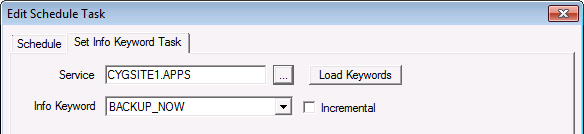
  1. Click Load Keywords to refresh the list of keywords. If the service is a VHS, it will also include the VHS_START_JOURNAL keyword.
  2. Select Incremental if you want to schedule an incremental backup.

Edit Schedule Task

Back to top

Let us know how we can improve this topic.

CygNet at weatherford.com

© 2020 Weatherford. All rights reserved.